
Details
DESCRIPTION
How does it work?
Between two (or multiple) readers, a connection is established via TCP/IP, where the “Master” reader sends triggers across the network to connected Slave readers. After receiving a trigger, the Slave reader sends data back to the Master. The Master then sends the combined results to a host system.
Purpose
This script is useful for exchanging data between readers when the “Master-Slave” feature isn’t available or if you are using unsupported devices. It can also collect data from third-party peripherals. The script can be expanded to support multiple Slave readers, but doing so increases the complexity and may require modifications. Note that data synchronization is not always perfect, especially in quick-paced applications where data might be lost.
REQUIREMENTS
Hardware
This script was designed to work with both fixed-mount and handheld readers. It was tested on the DataMan 470 and DataMan 260 series.
Hardware List:
- Two DataMan Readers
- Network Switch
- Test Setup
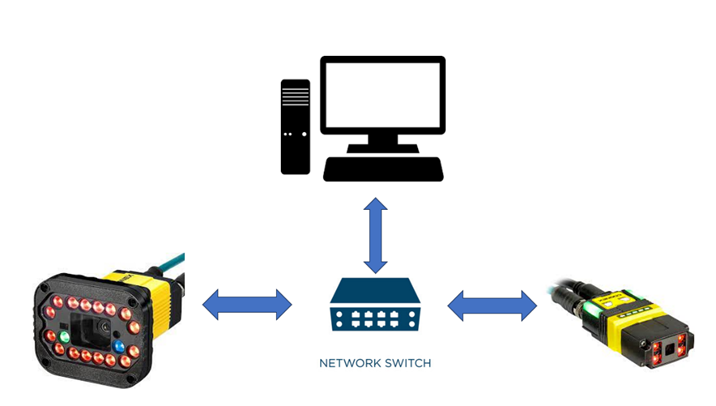
Picture 1: Test setup for exchanging data between readers.
HOW TO USE IT?
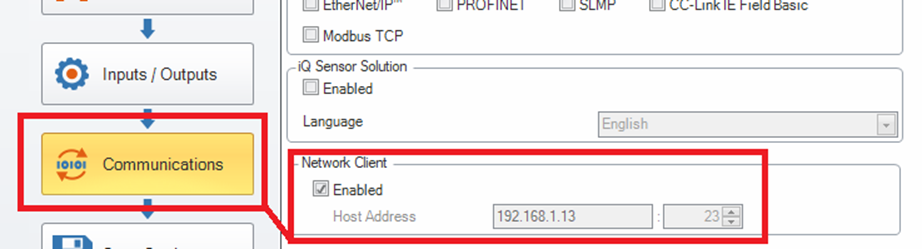
Setting up Network Client on Slave Reader
To set up a network client on the Slave reader, go to the Communications settings and specify the host address and port, as shown in Picture 2.
Uploading Scripts to Reader
Make sure scripting is enabled in the Format Data tab. Both the data formatting and communication scripts need to be uploaded.
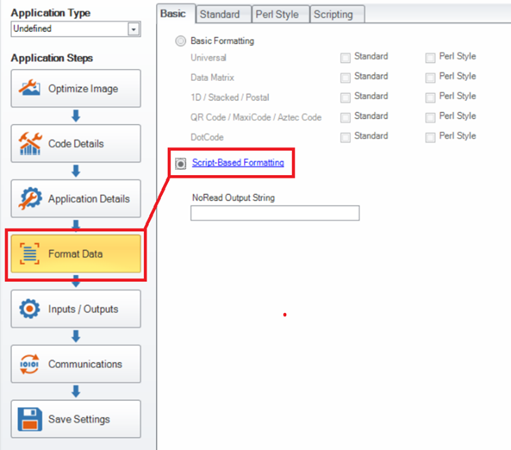
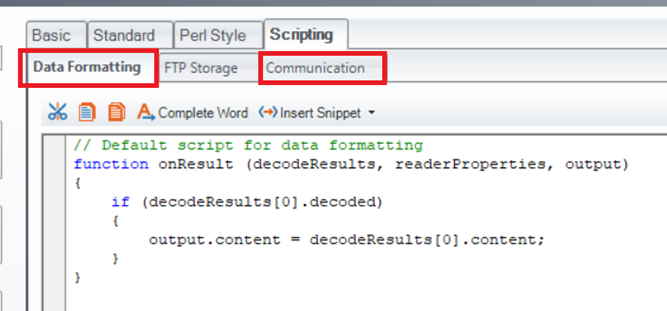
This image demonstrates how to upload the scripts to the Data Formatting and Communication tabs on the reader’s interface. Ensure both scripts are uploaded correctly for the system to function as intended.
SAMPLE SCRIPT
Data Formatting Script – Master
"use strict";
/*Constants declaration */
const TIME_OUT = 0.3; //Time out for slave response
const NOREAD = "No Read"; //No read declaration
const DELIM = ";"; //Delimiter declaration
const TRIG_MSG_ON ='||>TRIGGER ON\r\n'; //Trigger On message sent to Slave
const TRIG_MSG_OFF ='||>TRIGGER OFF\r\n'; //Trigger Off message sent to Slave
/*Variables declaration */
let masterCode = ''; //Master code declaration
let slaveString1 =''; //Slave code declaration
function onResult (decodeResults, readerProperties, output){
masterCode = ''; //Clearing Master Code value
//After receiving a trigger off message from the master, the system is waiting up to the TIME_OUT
//to receive data from the slave
if (comHandler !== null) { //Check if serial handler is enabled
comHandler.setTimer(TIME_OUT); //Lunch timer with defined time value
}
if (decodeResults[0].decoded){
masterCode = decodeResults[0].content; //Add decoded code to variable
}
output.content = ""; //Sending empty message on standard outputs
}
Communication Script – Master
"use strict";
// Constants declaration
const SLAVE1_IP = '192.168.1.203'; // IP address of Slave 1
const SLAVE_PORT = '23'; // Slaves port
const STX = '\x02';
const ETX = '\x03';
const HEADER = STX; //Input String Header
const FOOTER = ETX; //Input String Header
const HOST_IP = '192.168.1.130'; //Declaration of Host IP
const HOST_PORT = '23';
const LOG = true; // Logging enabled
//Handlers declaration
let slaveHandler1 = null; //Slave 1 handler
let comHandler = null; //Com handler - used for timer
let hostHandler = null; //Declaring Host handler (PC)
let temp = ''; //Used for controlling received data by Master from Host
function CommHandler(localName){
return {
//In onConnect part we are declaring 3 handlers:host(ETH), Slave (ETH) and timer(COM)
onConnect: function (peerName){
let peerIP = peerName.split(':')[0]; //Declaring connected peer IP (Slave IP)
let peerPort = peerName.split(':')[1]; //Declaring connected peer port (Slave port)
let localPort = localName.split(':')[1]; //Declaring connected local port (Host port)
const sourceIP = peerName.substr(0, peerName.lastIndexOf(':')) //Declaring connected system (Host IP)
if (sourceIP === HOST_IP && localPort ===HOST_PORT) { //Opening Host handler, If IP is the defined host IP address and specified port
hostHandler = this;
hostHandler.expectFramed(HEADER, FOOTER, 64); //Declaration of expected frame <STX MSG ETX>
logMsg('Ethernet Handler Connected!');
return true;
} else if (peerIP === SLAVE1_IP && peerPort === SLAVE_PORT) { //Opening Slave handler
slaveHandler1 = this;
slaveHandler1.expectFramed(HEADER, FOOTER, 64);//Declaration of expected frame <STX MSG ETX>
logMsg('SLAVE1 Connected');
return true;
}
if (peerIP.substr(0, 3) === 'COM') { //Opening COM handler
comHandler = this;
logMsg('COM Connected');
return true;
}
return false;
},
onDisconnect: function (){},
onError: function (errorMsg){},
onExpectedData: function (inputString) { //Note: unused handler should be commented.
if (this === slaveHandler1) { //Receiving data from Slave 1
logMsg('Slave Handler 1:' + inputString);
slaveString1=inputString;
slaveString1='';
}
if (this === hostHandler) { //Receiving data from Host
temp = inputString;
logMsg('Host Handler:' + inputString);
if(temp == "START"){ //When START message is received Master is sending trigger command to Slave
slaveString1=''; //and starting to trigger itself
dmccCommand('TRIGGER', 'ON');
slaveHandler1.send(TRIG_MSG_ON);
temp='';
}
if(temp == "STOP"){ //When STOP message is received Master is sending stop command to Slave
dmccCommand('TRIGGER', 'OFF'); //and turning off itself
slaveHandler1.send(TRIG_MSG_OFF);
temp='';
}
}
return true;
},
onUnexpectedData: function (inputString) {
if (this === comHandler) {
logMsg("WRONG MSG: "+inputString); //Logging data when it's not correct according to the declared frame
}
return true;
},
onTimer: function () {
if(comHandler === this){
logMsg ("COMHandler on");
slaveHandler1.send(TRIG_MSG_OFF); //Turning triggering off on Slave 1
hostHandler.send(masterCode+DELIM+slaveString1); //Sending combined results to Host
slaveString1=''; //Clearing Slave 1 data
masterCode=''; //Clearing Master decode codes
}
},
onEncoder: function () {}
};
}
function logMsg(msg) {
if (LOG) {
console.log(msg);
}
}
Data Formatting Script – Slave
"use strict";
const STX = '\x02';
const ETX = '\x03';
let outputCode = '';
let outputString = '';
dmccSet("LIGHT.DIRECT", "OFF OFF OFF OFF");
function onResult(decodeResults, readerProperties, output) {
outputCode = '';
outputString = '';
if (decodeResults[0].decoded) {
outputCode = decodeResults[0].content;
}
if (outputCode!='') {
outputString = STX + outputCode + ETX;
}
else{
outputString = STX + '' + ETX;
}
if (primaryHandler !== null) {
primaryHandler.send(outputString);
}
output.content = '';
output.SetupTool = 'Output String: ' + outputString;
}
Communication Script – Slave
"use strict";
const LOG = true;
const PRIMARY_IP = dmccGet('NETWORK-CLIENT.HOST-ADDRESS').response;
const PRIMARY_PORT = dmccGet('NETWORK-CLIENT.HOST-PORT').response;
let primaryHandler = null;
function CommHandler (localName) {
return {
onConnect: function (peerName) {
logMsg('New Connection: ' + localName + ' ' + peerName);
const sourceIP = peerName.substr(0, peerName.lastIndexOf(':'));
const peerPort = peerName.substr(peerName.lastIndexOf(':') + 1);
if (sourceIP === PRIMARY_IP && peerPort === PRIMARY_PORT) {
logMsg('Primary handler connected');
primaryHandler = this;
return true;
}
return false;
},
onDisconnect: function () {
if (this === primaryHandler) {
primaryHandler = null;
console.log('Primary handler disconnected');
}
},
onError: function (errorMsg) {
},
onExpectedData: function () {
},
onUnexpectedData: function (inputString) {
},
onTimer: function () {
},
onEncoder: function () {
}
};
}
function logMsg (msg) {
if (LOG) {
console.log(msg);
}
}
CONSIDERATIONS FOR DATA SYNCHRONIZATION
While using this system, data synchronization is essential but may not always be perfect. Consider these points:
- Time Delays:
The Master reader sends triggers to the Slave, which may introduce a delay due to network latency. This could result in delayed data responses. The TIME_OUT parameter is used to avoid indefinite waiting, but it may need adjustment based on network speed. - Data Loss:
In fast-paced operations, data loss can occur if the Slave doesn’t respond in time. Adjusting the TIME_OUT value or optimizing data handling can help reduce the risk of losing important data. - Multiple Slaves:
When connecting multiple Slave readers, synchronization becomes more complex. The Master may not always receive data in the correct order, especially if Slaves respond at different times. Consider increasing the time buffer between triggers to allow each Slave sufficient time to respond. - Data Handling:
The Master must handle data from multiple Slaves and format it correctly before sending it to the host. Proper data validation and error handling are necessary to avoid sending incomplete or corrupted data. - Buffer Overflows:
If too many triggers are sent rapidly, buffer overflows could occur, preventing the Master or Slave from processing data correctly. Increasing time intervals or using an intermediate buffer to manage data can help mitigate this issue.
Conclusion
By following these steps and addressing synchronization concerns, you can ensure smooth communication between the Master and Slave readers. Proper configuration, timing adjustments, and data handling will lead to reliable results and seamless data transfer to the host system.