
Question
Why is the decode time on my new DataMan 290 or DataMan 390 significantly higher than when reading the same code with a DataMan 280 or DataMan 150/260 reader?
Answer
The DataMan 290 and DataMan 390 readers include an AI-supported finder algorithm that runs on a dedicated Neural Processing Unit (NPU). This AI-based finder enhances code detection in challenging applications but also adds additional processing overhead to each decode cycle.
As a result, decode times may be higher compared to older DataMan readers that rely exclusively on rule-based decoding algorithms.
Many applications do not require AI-assisted finding and will perform well using the standard algorithms alone.
The DataMan 290 and DataMan 390 readers include an AI-supported finder algorithm that runs on a dedicated Neural Processing Unit (NPU). This AI-based finder enhances code detection in challenging applications but also adds additional processing overhead to each decode cycle.
As a result, decode times may be higher compared to older DataMan readers that rely exclusively on rule-based decoding algorithms.
Many applications do not require AI-assisted finding and will perform well using the standard algorithms alone.
How to Reduce Decode Time
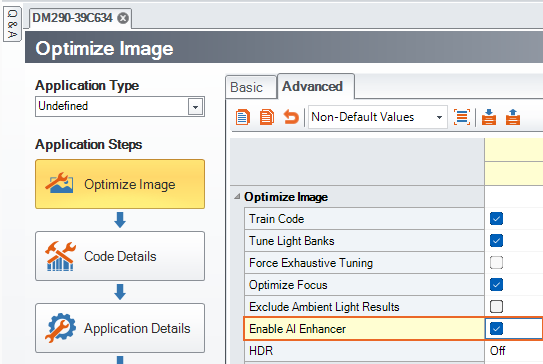
If AI-assisted finding is not required for your application, it can be disabled manually:
- Open DataMan Setup Tool
- Go to Optimize Image → Application Step
- Open the Advanced tab
- Disable the AI Enhancer
Disabling this feature reduces processing load and can significantly improve decode time.
Summary
- DataMan 290 / DataMan 390 use AI-based finders running on an NPU.
- AI processing increases decode time in some applications.
- Standard rule-based decoding is sufficient for many use cases.
- Disabling the AI Enhancer can improve performance.