
Details
DESCRIPTION
Purpose
This script is designed for use in applications where HTTP communication is required between Cognex DataMan readers and a server. It allows for easy integration of Cognex readers with external servers, facilitating the transfer of data.
REQUIREMENTS
Hardware
This script is specifically designed to work with fixed-mount Cognex DataMan readers. Below is the list of hardware needed:
- Cognex DataMan Reader: A fixed-mount barcode reader from the Cognex DataMan series.
- HTTP Server: The server that will receive data from the DataMan reader.
HOW TO USE IT?
Structure of HTTP Messages
The HTTP communication between the Cognex DataMan reader and the server is structured in a standard HTTP format. Below is the basic structure of the HTTP message used in this communication:
- Method: The HTTP method used in this script is typically "POST" because data is being sent from the reader to the server.
- URL: The server URL where the data will be posted.
- Headers: Information about the request, such as content type, authentication, etc.
- Body: The data sent from the reader to the server.
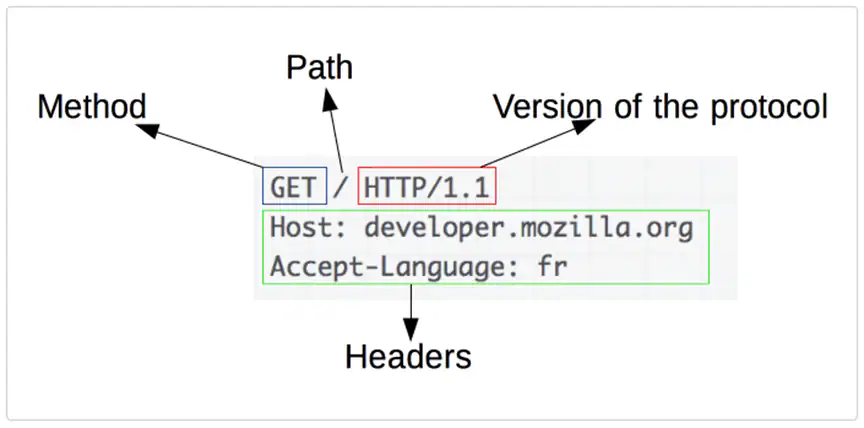
(At this point, you would include an image of the HTTP request structure, but it's currently missing in the provided text.)
The response from the server can vary depending on the request, and it may include confirmation or additional data, as shown in the next picture.
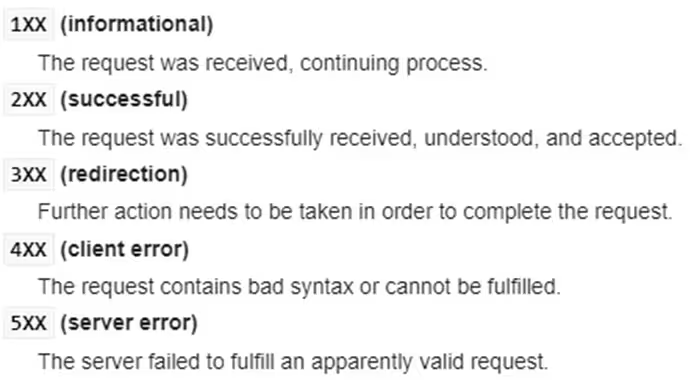
(An image of possible server responses, like HTTP status codes or data, would go here.)
Uploading Scripts to Reader
To enable script-based communication, the script should be uploaded to the reader's configuration interface.
Enable Script-Based Formatting:
- Navigate to the “Format Data” tab in the reader’s configuration settings.
Ensure that script-based formatting is enabled, which allows the reader to process custom scripts.
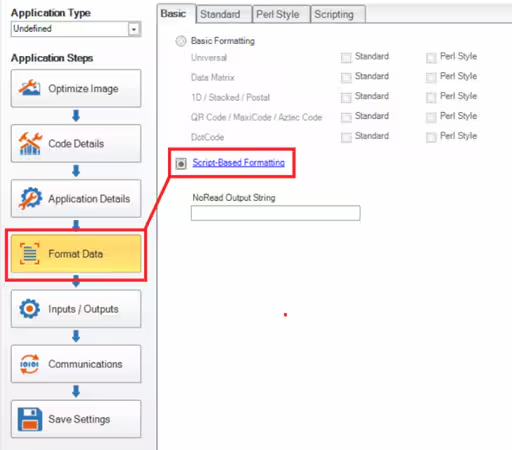
(At this point, you would include an image of the setting or toggle in the DataMan configuration interface.)
Upload Scripts to the Reader:
- Scripts for both data formatting and communication should be uploaded to their respective tabs within the reader configuration.
Ensure that the scripts are correctly placed in the Data Formatting tab for data manipulation and in the Communication tab for setting up HTTP communication.
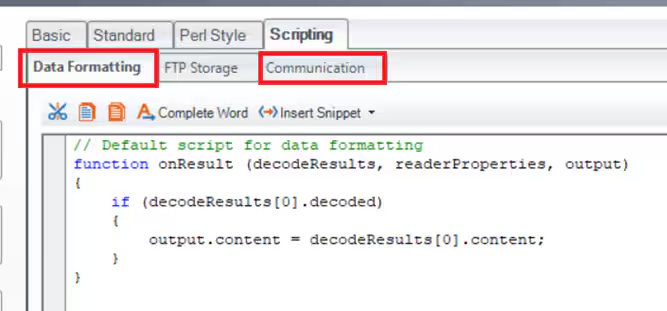
(Another image would go here showing how the scripts are uploaded or a screenshot of the DataMan interface.)
Additional Notes
- Ensure that the DataMan reader has a stable network connection to the HTTP server for successful data transmission.
- The HTTP server should be configured to handle POST requests and properly interpret the data sent by the DataMan reader.
This guide provides a basic overview of the HTTP communication process between the DataMan reader and the server. The script can be customized based on specific application needs.
Sample scripts
Data formating script
'use strict';
let decodedCode = '';
let outputString = '';
function onResult (decodeResults, readerProperties, output) {
if (decodeResults[0].decoded) {
decodedCode = decodeResults[0].content;
}
if (decodedCode!='') {
const codeData = { //Constructing data fields (they can be freely modified)
readerConex0100: {
header: {
messageType: "stationConfirmation",
messageVersion: "0100",
senderId: "COGNEX-DM474",
siteId: "Side-01",
clientId: "Test"
},
repackConfirmation: [
{
containerId: decodedCode,
containerType: "EUR6",
containerWeight: 4,
containerStatus: "Open",
locationId: "AZONE",
}
]
}
};
outputString = getHTTPMsg(JSON.stringify(codeData));
}
output.content = outputString;
}
//Fucntion used to format data according to HTTP requierments
function getHTTPMsg (convertdata) {
if (convertdata.length > 0) {
return 'POST ' + HTTP_ADDR + ' ' + HTTP_VER + CRLF +
'Host: ' + HTTP_HOST + CRLF +
'Accept: ' + HTTP_JSON + CRLF +
'Content-type: ' + HTTP_JSON + CRLF +
'Authorization: ' + HTTP_AUTH + CRLF +
'Content-Length: ' + convertdata.length + CRLF + CRLF +
convertdata;
}
}
Communication Script
'use strict';
const LOG = true; //Logging to Device Log enabled
const HTTP_ADDR = '/wms/automation/cognex/1.1.0/cc/'; // address of data stream
const HTTP_HOST = 'http://sample.server.com';; // http address of host server
const HTTP_JSON = 'application/json'; //Application type (JSON)
const HTTP_VER = 'HTTP/1.1';
const HTTP_AUTH = 'SampleKey'; //autentication key
const TCP_IP = 'sample.server.tcp.com'; //Sample address of TCP/IP server
const TCP_PORT = 8500; // TCP IP port decalration
let httpHandler = null;
function CommHandler (localName) {
return {
onConnect: function (peerName) {
logMsg('localName: ' + localName + ' peerName: ' + peerName);
const sourceIP = peerName.split(':')[0];
const localPort = localName.split(':')[1];
if (sourceIP === TCP_IP && localPort === TCP_PORT) {
httpHandler = this;
logMsg('TCP connected');
return true;
}
return false;
},
onDisconnect: function () {
if (this === httpHandler) {
httpHandler = null;
logMsg('TCP disconnected');
}
},
onError: function (errorMsg) {},
onExpectedData: function (inputString) {
if (this === httpHandler) {
logMsg('TCP data received: ' + inputString);
}
return true;
},
onUnexpectedData: function (inputString) {
return true;
},
onTimer: function () {
},
onEncoder: function () {}
};
}
function logMsg (msg) {
if (LOG) {
console.log(msg);
}
}