
Details
DESCRIPTION
How Does It Work?
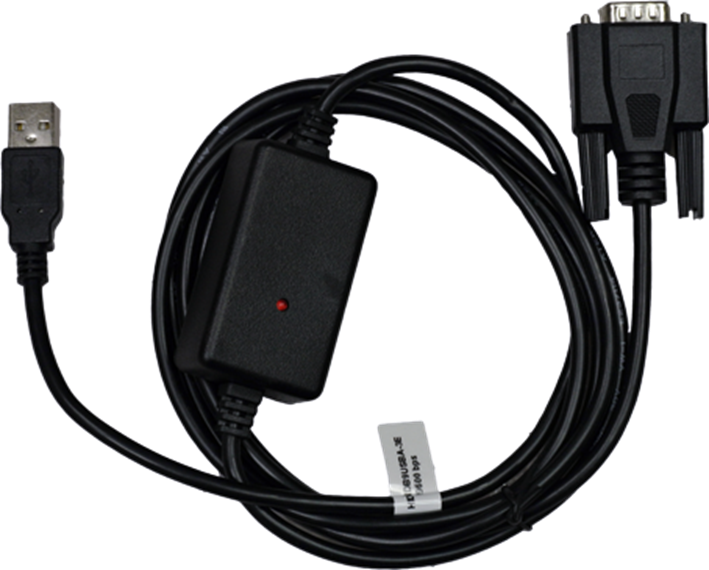
In this system, data from the Cognex DataMan reader is sent via RS232 to a USB-HID converter. The converter transforms the data into a format that can be understood by a computer system via USB. The script facilitates additional control characters (such as TAB, SHIFT, etc.), which are then sent to the customer system.
- RS232 to USB-HID Converter: This converter, from Intelleto, allows communication between the reader and a USB interface. It is responsible for transmitting the barcode data from the DataMan reader to the host system.
Purpose
This script is particularly useful in applications where the output from the Cognex DataMan reader needs to be sent to a system that requires communication over USB-HID.
- Singulate Output Results: This process ensures that the data from the reader is properly formatted and transmitted to systems that need to process or respond to the scanned barcode data.
REQUIREMENTS
Hardware
This script is designed to work with fixed-mount readers and has been tested with the DataMan 470 series. The necessary hardware for the system includes:
- Cognex DataMan Reader: A barcode reader for scanning.
- Intelleto USB-HID Converter: Converts the RS232 signals from the DataMan reader to USB-HID.
- Optional: Cognex I/O Box (for easier installation, optional but recommended for setup flexibility).
HOW TO USE IT?
Uploading Scripts to Reader
- Enable Script-Based Formatting:
- Navigate to the “Format Data” tab in the configuration settings of the Cognex DataMan reader.
Ensure that script-based formatting is turned on. This will allow the DataMan reader to process the custom scripts for data formatting and communication.
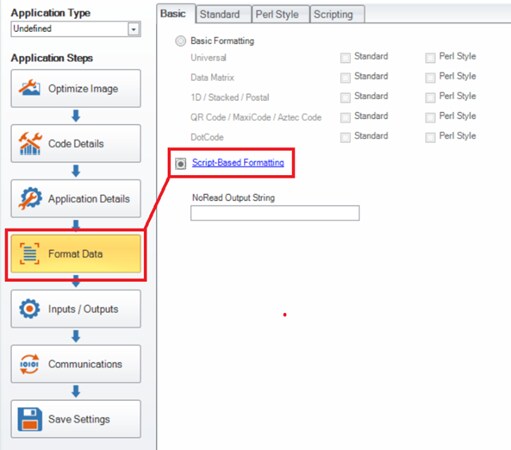
Picture 2: Enabling Script-Based Formatting
- Upload Scripts to the Reader:
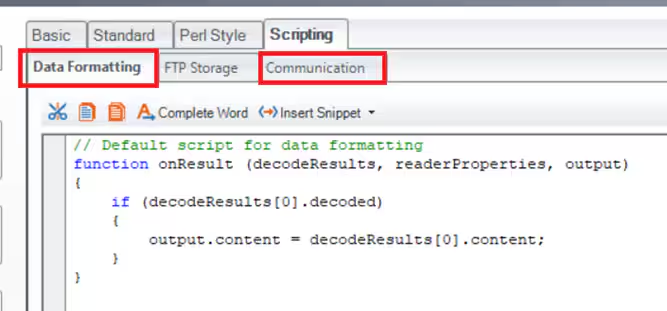
- The scripts should be uploaded to the appropriate tabs in the DataMan configuration interface:
- Data Formatting Tab: For formatting the data to fit the required communication format.
- Communication Tab: For setting up how the reader will communicate with the external system via USB-HID.
- The scripts should be uploaded to the appropriate tabs in the DataMan configuration interface:
SAMPLE SCRIPT
This script should be customized to meet the specific needs of your system, whether it's formatting the data for a particular application or adding additional characters for proper communication.
Data Formatting Script
'use strict';
const ENTER = '\x0D\x0A';
const F2 = '\xB6';
const F3 = '\xB7';
const F12 = '\xC0';
const F7 = '\xBB';
const DELETE = '\x7F';
const BACKSPACE = '\x08';
const TAB = '\x09';
const CTRLA = '\x01';
const SHIFT_TAB = '\x8F\x02\x09';
const DELAY = 2; //Delay time for outputing second part of string
const MODE_S = "standard";
const MODE_M = "multiple";
//Declaration of Variables
let mode = false; //default false (simple mode)
let outPut = '';
let palleteEndCode =''; //End Pallete Indetificator
let multipleEndCode = ''; //End Multiple Code Identificator
let codeType = false; //true for Code 39
let secondRun = false; // true for last transimt at multiple mode
function onResult (decodeResults, readerProperties, output){
outPut = '';
codeType = false;
secondRun = false;
palleteEndCode = multiSymbol(TAB,8)+" "+multiSymbol(TAB,3)+" ";
multipleEndCode = multiSymbol(SHIFT_TAB,7);
if (decodeResults[0].decoded){ //Checking for simple mode code
if(decodeResults[0].content==MODE_S){
mode = false;
output.SetupTool = decodeResults[0].content + " " + mode; //temporary output for SetupTool
}
if(decodeResults[0].content==MODE_M){ //Checking for multiple mode code
mode = true;
output.SetupTool = decodeResults[0].content + " " + mode; //temporary output for SetupTool
}
if (mode==false){ //Output for single mode if ((decodeResults[0].content!=MODE_S)&&(decodeResults[0].content!=MODE_M)){
outPut=decodeResults[0].content;
}
}
if (mode ==true){ //OutPut for multi mode
if ((decodeResults[0].symbology.name == "UPC/EAN") || ((decodeResults[0].symbology.name == "Code 128")&&(decodeResults[0].content.length==13))){
outPut = multiSymbol(TAB,11);
outPut+= CTRLA;
outPut+= decodeResults[0].content;
outPut+= F7;
if (serialHandler !== null) { //Launching delay
serialHandler.setTimer(DELAY);
}
}
}
if (decodeResults[0].symbology.name == "Code 39"){ //Output for pallet workflow
outPut = multiSymbol(TAB,10);
codeType = true;
outPut+= "P";
outPut+= multiSymbol(TAB,3);
outPut+= "S";
outPut+= multiSymbol(SHIFT_TAB,4);
outPut+= CTRLA;
outPut+= decodeResults[0].content;
outPut+=F7;
if (serialHandler !== null) { //Launching delay
serialHandler.setTimer(DELAY);
}
}
}
output.content = outPut;
}
function multiSymbol(symbol,count){ //Function for making multiple characters as a string
let tempSymbol='';
for (var i =0;i<count;i++){
tempSymbol+=symbol;
}
return tempSymbol;
}
Communication Script
'use strict';
const LOG = true; //Enable loggin. Results could be found in Device Log
let serialHandler = null; //Declaring serial (COM) handler
function CommHandler(localName) {
return {
onConnect: function (peerName) {
if (peerName === 'COM1') { //Opening connection on COM
serialHandler = this; // Enableing serial handler
logMsg('Serial Handler Connected!'); //Logging message that connection have been established
return true;
}
return false;
},
onDisconnect: function () {
if (this === serialHandler) {
serialHandler = null; //Disableing serial handler
logMsg('Serial Handler Disconnected!'); //Logging message that connection have been clossed
}
},
onExpectedData: function () {},
onUnexpectedData: function () {},
onTimer: function () { //When timer counts to desired value send data
if (this === serialHandler) { //Check if connection is open
if(secondRun == true){
serialHandler.send(multipleEndCode);
}
if ((codeType) && (secondRun==false)){
serialHandler.send(palleteEndCode); //send string for pallet workflow
}
if((codeType==false)&&(secondRun==false)){
serialHandler.send(ENTER); //send data for multiple mode
secondRun = true;
if (serialHandler !== null) { //Launching timer again
serialHandler.setTimer(DELAY);
}
}
}
}
};
}
function logMsg (msg) { //Function for loggin messages
if (LOG) {
console.log(msg);
}
}