
Details
Purpose:
This script serves as a foundational template for creating a presentation reading application. It demonstrates how to use multiple timers on the DataMan 280 reader series. Data from the reader is outputted via USB HID mode.
Requirements
Hardware:
This script is designed for use with fixed-mount readers, specifically tested on the DataMan 280 series.
Hardware List:
- DataMan reader
How to use it?
Setting up HID Mode on DataMan 280 Series Reader:
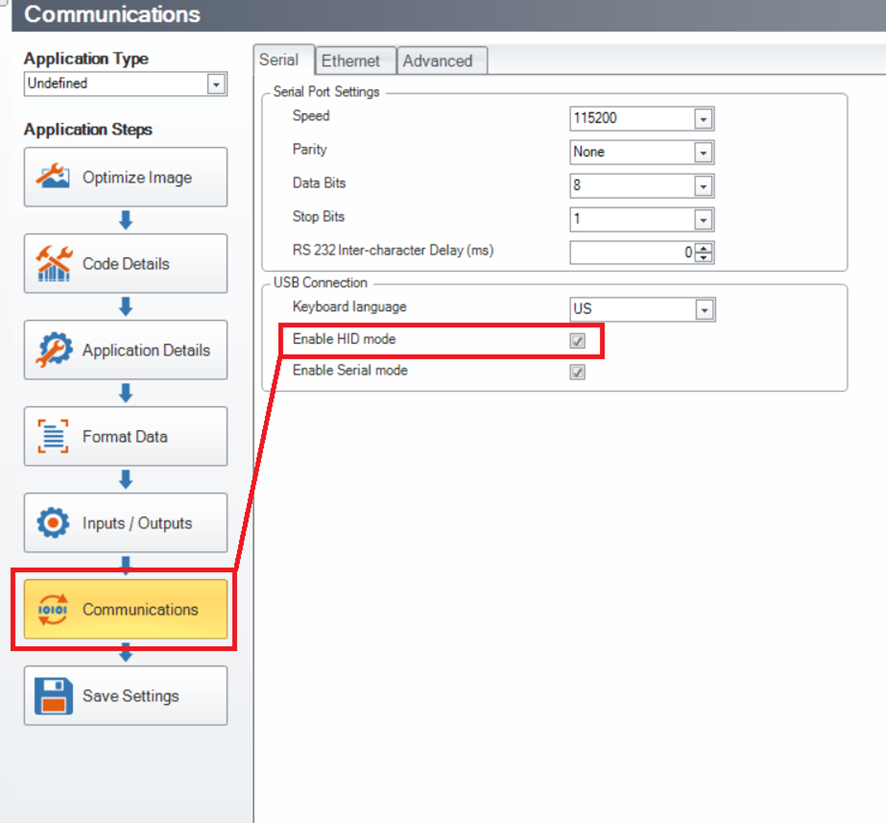
To enable HID mode, navigate to the Communication settings, as shown in Picture 1.
Uploading Scripts to Reader:
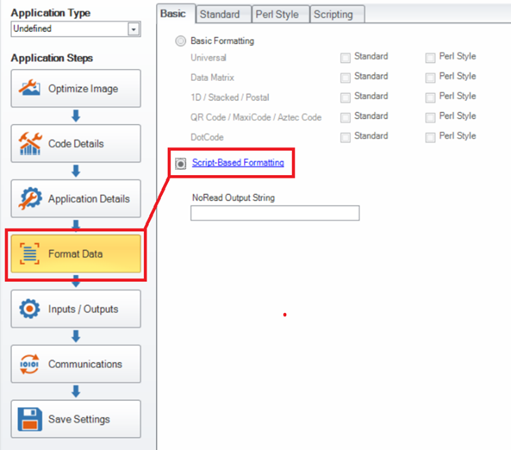
Ensure that scripting is enabled in the “Format Data” tab.
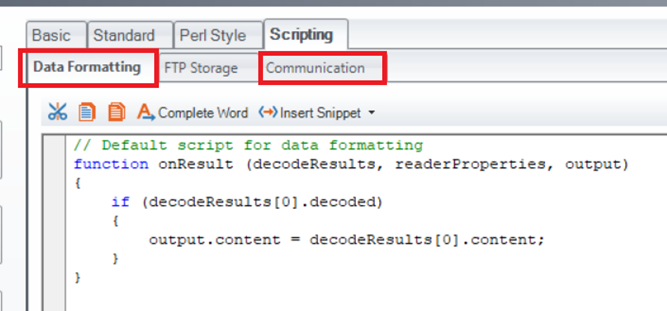
Both the Data Formatting and Communication scripts should be uploaded to their respective tabs.
Sample Script
Data Formatting Script:
"use strict";
// Constants declaration
const ENTER = '\x0A\x0D'; // Enter at the end of output string
const TIME_LIGHTS = 2; // Time for how long lights stay off after a successful scan
const TIME_SEND = 1; // Delay before sending scanned results
const TIME_RESET = 5; // Time to reset "never read same code twice" feature
const MAX_ITEMS = 5; // Number of last remembered decodes
// Variables declaration
let outPut = ''; // Output string
let result = ''; // Data to be sent via communication handler
// DMCC initial setup
dmccSet('LIGHT.DIRECT', "ON ON ON ON"); // Turn on lights
dmccSet('LIGHT.HIGH-FREQUENCY', "ON"); // Turn on high-frequency lights
dmccSet('DECODER.REREAD-NEVER2X', 'ON'); // Prevent reading the same code twice
dmccSet('DECODER.REREAD-NOT-LAST-N', MAX_ITEMS); // Prevent reading the last N codes
function onResult (decodeResults, readerProperties, output) {
outPut = ''; // Reset the output string to default value
if (decodeResults[0].decoded) {
// Reset settings to prevent reading the same code
dmccSet('DECODER.REREAD-NEVER2X', 'ON');
dmccSet('DECODER.REREAD-NOT-LAST-N', MAX_ITEMS);
result = decodeResults[0].content; // Store the decoded result
dmccCommand("BEEP", 1, 2); // Beep after successful decode
dmccSet("LIGHT.DIRECT", "OFF OFF OFF OFF"); // Turn off lights
// Start timers for different handlers
if (serialHandler !== null) {
serialHandler.setTimer(TIME_LIGHTS);
}
if (comusbHandler !== null) {
comusbHandler.setTimer(TIME_RESET);
}
if (keybrdHandler !== null) {
keybrdHandler.setTimer(TIME_SEND);
}
}
output.content = outPut;
}
Communication Script:
"use strict";
const LOG = true; // Enable logging. Results are found in Device Log
let keybrdHandler = null; // Ethernet handler
let serialHandler = null; // Serial (COM) handler
let comusbHandler = null; // COM USB handler
function CommHandler(localName) {
return {
onConnect: function (peerName) {
console.log('New Connection -> peerName:' + peerName + ', localName:' + localName);
if (peerName === 'COM1') { // COM connection
serialHandler = this; // Enable serial handler
logMsg('Serial Handler Connected!');
return true;
}
else if (peerName === 'keybrd'){ // Keyboard connection
keybrdHandler = this;
logMsg('Keyboard Handler Connected!');
return true;
}
else if (peerName === 'COM USB'){ // COM USB connection
comusbHandler = this;
logMsg('COM USB Handler Connected!');
return true;
}
return false;
},
onDisconnect: function () {
// Disconnect logic for handlers
if (this === serialHandler) {
serialHandler = null;
logMsg('Serial Handler Disconnected!');
}
if (this === keybrdHandler) {
keybrdHandler = null;
logMsg('Keyboard Handler Disconnected!');
}
if (this === comusbHandler) {
comusbHandler = null;
logMsg('COM USB Handler Disconnected!');
}
},
onTimer: function () {
// Timer logic for different handlers
if (this === serialHandler) {
console.log('Serial timer reached - turning on lights');
dmccSet("LIGHT.DIRECT", "ON ON ON ON");
dmccSet("LIGHT.HIGH-FREQUENCY", "ON");
}
if (this === keybrdHandler) {
console.log('Keyboard timer reached - sending data');
keybrdHandler.send(result + ENTER);
}
if (this === comusbHandler) {
console.log('COM USB timer reached - resetting "never read same code twice"');
dmccSet('DECODER.REREAD-NEVER2X', 'OFF');
dmccSet('DECODER.REREAD-NOT-LAST-N', 0);
}
}
};
}
function logMsg (msg) {
if (LOG) {
console.log(msg);
}
}