
Question
How can I switch jobs using my PLC?
Answer
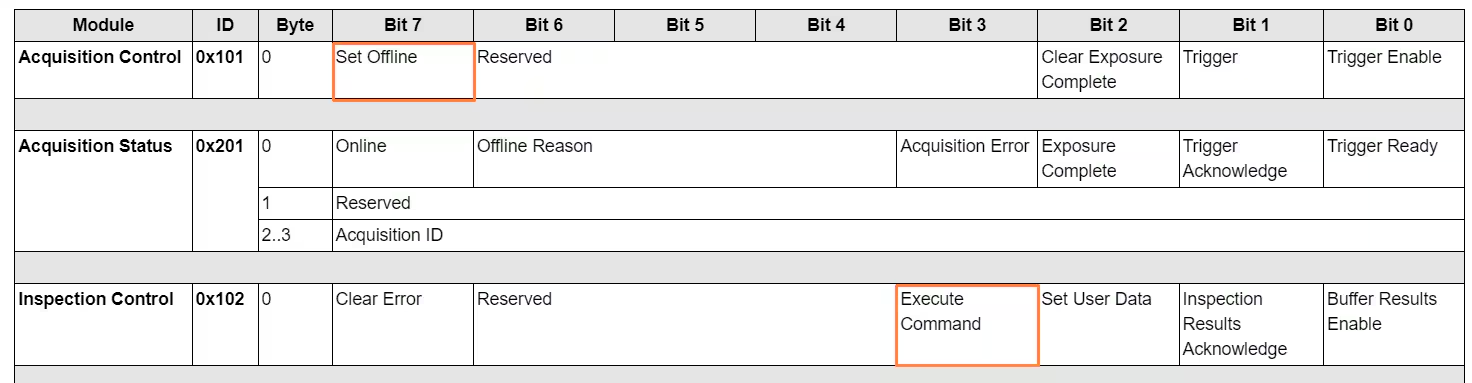
When loading a new job, first place the vision system to an Offline state by setting the Set Offline bit.

Use the applicable Command ID in the command block to initiate the job change.
Note: You can change jobs by two means:
By Name: You can change jobs by specifying their name (without the *.jobx extension). In this case, the PLC supplies the ASCII character string in the userdata segment corresponding to the name of the job you want to switch to.
For example, if you supply the string “myjob” in the userdata segment, then the vision system will load the myjob.jobx job once the PLC executes the load command.
By ID: You can also change jobs by specifying their ID. Once the PLC executes the load command, the vision systems load the job if it finds one whose name contains the specified ID number.
For example, if you have a job named 111_myjob stored on the vision system, then specifying command 111 will load that job.
| Name | Command ID (Hex) | Command ID (Dec) |
| Load Job by Name | 0x4000 | 16384 |
| Load Job by ID | 0x0-0x3E7 | 0-999 |
Write the Command ID of the selected action into bytes 0-1 of the Command Control Input module as shown in the below table.

If you perform the Load Job by Name, write the job name into bytes 0-1015 of the User Data module if the command block as shown in the below table.

Set the Execute Command bit in the command block by setting high Bit 3 of the Inspection Control module as shown below.

Wait for the Command Completed or Command Failed bit to be set (Bit 6 or 5 of the Inspection Status module as shown below).

Once either the Command Completed or Command Failed bit is detected, clear the Execute Command bit. Also, if you previously set the vision system to an Offline state, then clear the Set Offline bit as well to set the vision system Online.
See Also:
In-Sight 3800/In-Sight 2800 – Industrial Communications: In-Sight Spreadsheet - Industrial Communications - Documentation | Cognex
In-Sight D900 – Industrial Communications: In-Sight® ViDi Help - Industrial Communications - Documentation | Cognex