Skip to Main Content
コグネックスサポートハブ
Logo

Deep Learning: Filter Expression Overview

ViDi Suite and VisionPro Deep Learning provide a filter grammar that allows you to construct expressions that filter the data in your ViDi stream in extremely flexible ways. These filter expressions are available in many different locations within the UI, as well as at run time.

2025/01/28

Details

Filter Expression Overview

The Deep Learning filter grammar allows you to write expressions that will evaluate to a Boolean, integer, or floating point value for each view in the current stream database.

View-Level and Axis-Level Variables

The filter grammar includes variables that are defined for views. You use these simply by including them in an expression that evaluates to a Boolean result :

  • width > 1500  // Filter to views with width greater than 1500

In addition to view-level variables, the grammar also supports tool-specific axis-level variables that you can to filter views based on the presence, absence, or values of individual markings, labels, and other view elements. Blue tool views, for example, include a feature axis for filtering based on individual features in the view. Axis-level filters are entered within square brackets following the axis name:

  • feature[score > 0.95]  // Filter to views containing a feature with score greater than 0.95

Where Filter Expressions can be Used in ViDi Suite/ VisionPro Deep Learning

The following table summarizes the contexts in which filter expressions are available. Some of them can also be used during runtime to filter results:


NotesRuntime setting


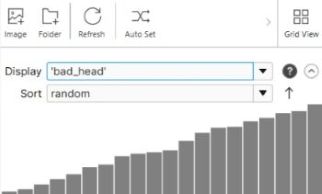
View Browser - Display Filter and Sort Filter

filter-expression-overview-image_1_322

Display Filter:

  • Expressions entered here must 
    evaluate to a Bool.
  • The view browser window will 
    only display the views for which 
    the returned value is True.
  • Clicking the Process button for 
    the tool only processes the views 
    for which the returned value 
    is True. 

Sort Filter:

  • Expressions entered must 
    evaluate to an Integer or a 
    Floating point value.
  • Views are ordered (ascending 
    or descending) based on the 
    value returned by the 
    expression.
No
ROI definition (Upstream Blue Tool and 
Green Tool)

Following a Blue Locate tool:

  • Feature axis filter expression to 
    determine which feature types are 
    used to generate ROIs.
  • Match axis filter expression to 
    determine which model matches 
    are used to generate ROIs.

    filter-expression-overview-image_2_290

Following a Green Classify tool :

  • View-level filter to determine which 
    views are processed.

    filter-expression-overview-image_3_290
Yes

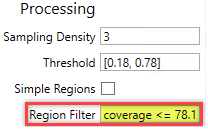
Region Filter (Red Tool)

filter-expression-overview-image_4

Red Analyze tool:

  • Region axis filter to determine 
    which regions are returned by the 
    tool (and in turn used for 
    downstream ROIs).
  • You can reference view level 
    properties using a viewprefix. 
    Note that only a handful of view 
    properties (e.g. width 
    and height) are available at 
    runtime.
Yes

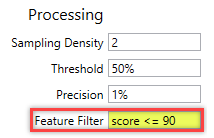
Feature Filter (Blue Tool)

filter-expression-overview-image_5

Blue Locate tool:

  • Feature axis filter that 
    determines which features 
    are returned by the tool (and in 
    turn used for downstream ROIs).
  • You can reference view level 
    properties using a view. prefix. 
    Note that only a handful of 
    view properties (e.g. width 
    and height) are available at 
    runtime.
Yes

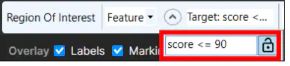
Database Overview Filter (Expert Mode only)
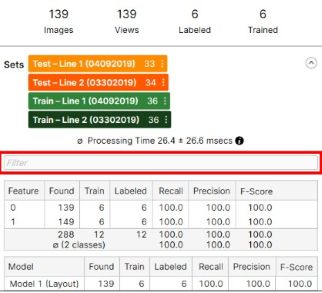
filter-expression-overview-image_6_322
  • You can use this filter on the 
    result of the processing.
  • This filter does not affect the 
    result of processing; it only 
    filters out the given processing 
    results.
  • It can affect the results shown 
    in the Database Overview 
    statistics, such as:
    • The Confusion Matrix
    • The Score Distribution Graph
    • Tables
  • The Database Overview filter 
    supports all tools.
 

Filter Grammar

  • https://community.cognex.com/support/s/article/filter-literal-values
  • https://community.cognex.com/support/s/article/deep-learning-filter-grammar-filter-built-in-variables-generic-view
  • https://community.cognex.com/support/s/article/deep-learning-filter-grammar-built-in-variables-tool-specific-view-level-variables
  • https://community.cognex.com/support/s/article/deep-learning-filter-grammar-built-in-variables-axis-level-variables
  • https://community.cognex.com/support/s/article/Deep-Learning-Filter-Grammar-Operators
  • https://community.cognex.com/support/s/article/deep-learning-filter-grammar-regular-expressions-in-filters

関連リソース