
Details
Prerequisites
- Ensure the DataMan device is powered off.
- Have a stable power supply ready.
Steps to Perform the Reset
- Prepare the Buttons:
- Before powering on, press and hold the following buttons simultaneously:
- TRIGG
- TUNE
- Before powering on, press and hold the following buttons simultaneously:
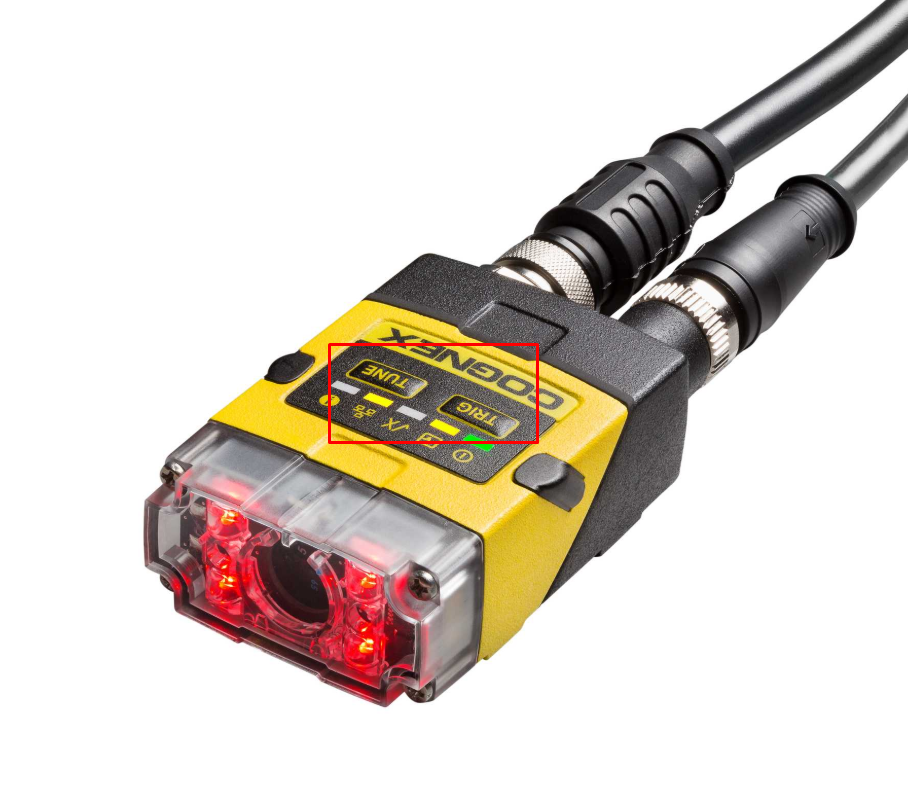
Power On the Device:
While holding both buttons, connect the power supply to the DataMan device.
Keep holding the buttons during the initial boot sequence.
Wait for Confirmation:
The device will indicate the reset process (usually via LED signals)
Release the buttons once the reset confirmation appears.
Restart:
After the reset completes, the device will reboot with factory default settings.
Details
Prerequisites
- Ensure the DataMan device is powered off.
- Have a stable power supply ready.
Steps to Perform the Reset
- Prepare the Buttons:
- Before powering on, press and hold the following buttons simultaneously:
- TRIGG
- TUNE
- Before powering on, press and hold the following buttons simultaneously:
Power On the Device:
While holding both buttons, connect the power supply to the DataMan device.
Keep holding the buttons during the initial boot sequence.
Wait for Confirmation:
The device will indicate the reset process (usually via LED signals)
Release the buttons once the reset confirmation appears.
Restart:
After the reset completes, the device will reboot with factory default settings.