
Details
Summary and Solution for the Issue: No Connection to In-Sight 3000 and 8000 Models on some laptops because of password request
- The cameras are detected in the network after starting the Vision Suite software.
- When attempting to connect via Spreadsheet or Easy Builder, a login dialog (username and password) appears.
- Regardless of the credentials entered, the connection fails and returns to the camera’s start page.
- supportinfo file show entries indicating authentication failed, and the connection was terminated.
Possible Solution:
It appears that certain encryption algorithms are required for authentication, which may have not been enables on some PC:
These can be found under the registry key:
Computer\HKEY_LOCAL_MACHINE\SYSTEM\CurrentControlSet\Control\Cryptography\Configuration\Local\SSL\00010003\Functions
The following entries were added to establish the connection to the cameras:
- RSAE-PSS/SHA256
- RSAE-PSS/SHA384
- RSAE-PSS/SHA512
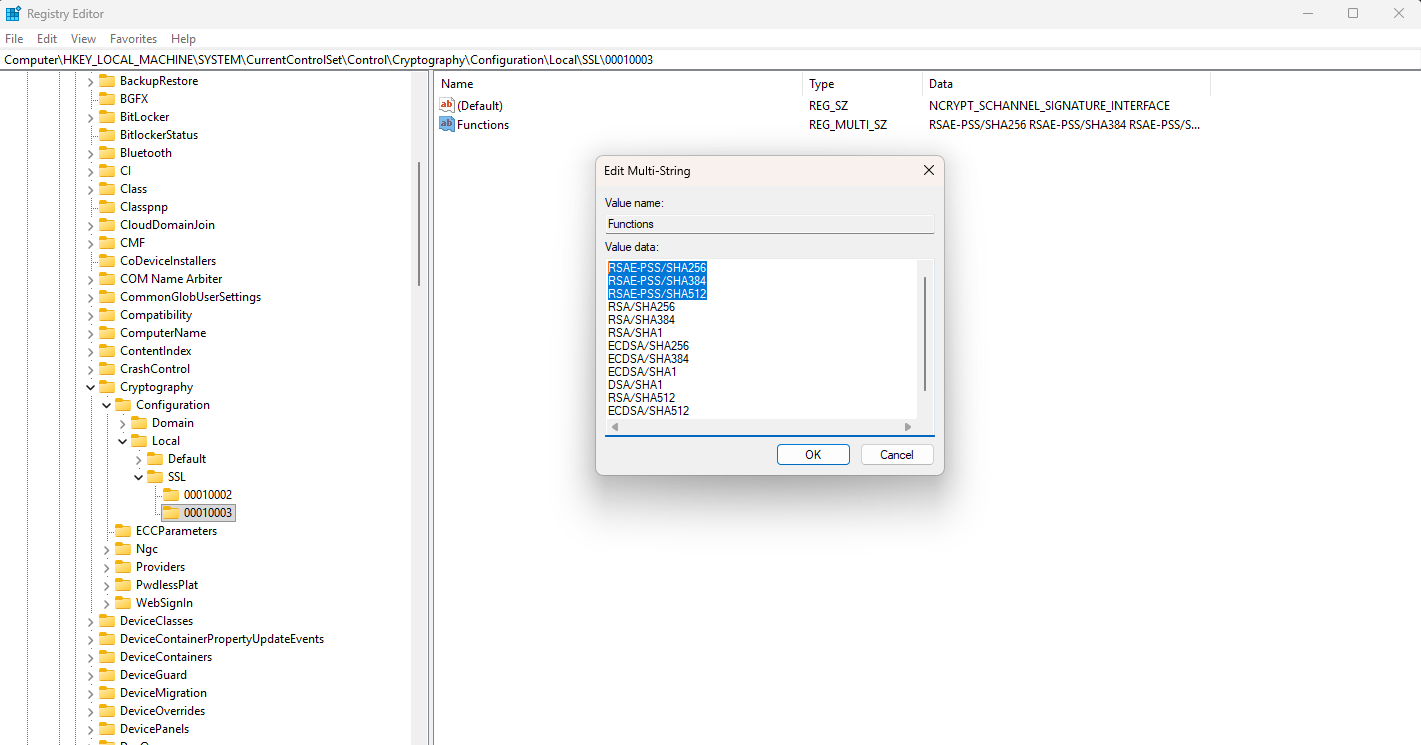
After this modification a connection without password request can be successfully made.