
Question
How do you create a Cognex Support file?
Answer
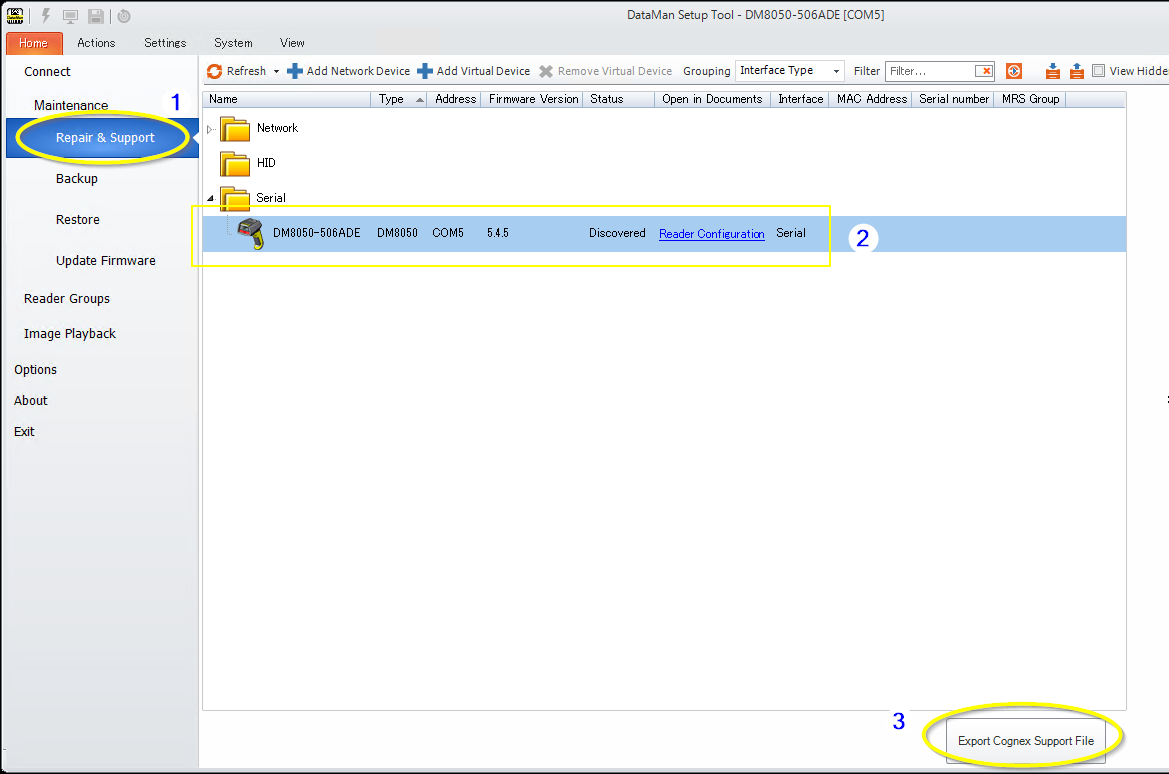
Creating a Cognex Support file using the DataMan Setup Tool helps our support team better understand your issue and provide more effective assistance. [Export Cognex Support File] button is available most of DataMan Setup Tool after version 5.7 or greater. Please follow the steps below:
Open the DataMan Setup Tool.
- In the left pane, select [Repair & Support]
- Choose the reader for which you want to create the support file
- Click the [Export Cognex Support] button located at the bottom right corner
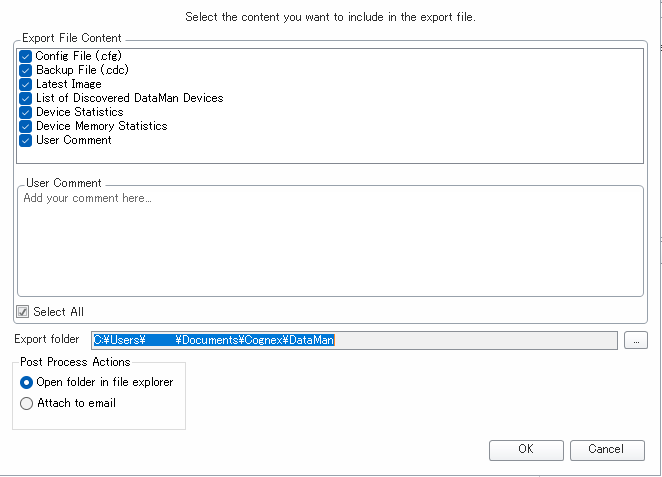
An options window will automatically open. Click [OK] in the bottom right. You do not need to change any settings unless necessary.
When finish creating, the saved directory will automatically open and the zip file will be found. Please provide this Zip to the support team. It will contain several files, including the following two main files that are also useful for users:
- Configuration File (.cfg): Saves the reader settings excluding network information and reader name.
- Backup File (.cdc): Saves the reader settings including network information and reader name.
- Additional files may also be saved depending on the reader’s configuration.