
This process describes the steps to add new features to your Cognex device through a Field Service Upgrade (FSU).
Cognex offers field upgrades for a variety of products, ensuring they remain up to date with the latest firmware and software enhancements. Here are the key product lines that can be field-upgraded:
- In-Sight Vision Systems: These include models like the In-Sight 3800, In-Sight 3900, and In-Sight L38 series, which can be upgraded to improve performance and add new features. The legacy models can be upgraded as well.
- VisionPro and ViDi Software: Cognex's VisionPro and ViDi software platforms can be upgraded to include new tools and algorithms for advanced machine vision applications.
- DataMan Barcode Readers: Both handheld and fixed-mount DataMan readers can receive feature key upgrades to enhance their capabilities and maintain compatibility with new standards.
The part number of the FSU indicates the product line that the upgrade is for. The FSU naming convention is defined below- You will find that your FSU will start with one of the following prefixes.
- VisionPro and ViDi Upgrades
- FSU-VP... for VisionPro
- FSU-DL... for VisionPro Deep Learning
- In-Sight Upgrades
- FSU-IS38…, FSU-IS39… for In-Sight 3800 and In-Sight 3900
- FSU-L38… for In-Sight L38
- FSU-D9… for In-Sight D900
- FSU-IS… for other In-Sight products
- Dataman Feature Key Upgrades:
- DM…
Upgrading your Device
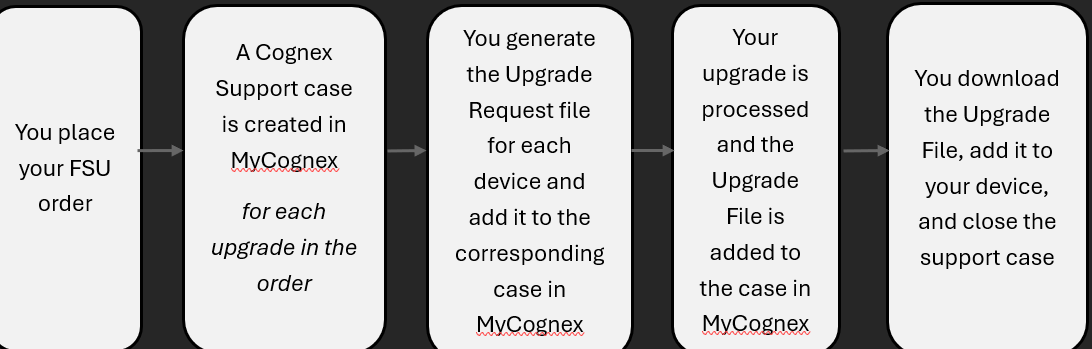
For each of these upgrades, the general process is the same. The steps in this process are outlined below:
- When an order containing an FSU is placed, a support case in MyCognex is created for each device to be upgraded. Each case will have the order number and the serial number of the device displayed.
- You generate an upgrade request file for each device and upload it to the corresponding case in your MyCognex account.
- The upgrade is processed automatically.
- You are notified that the upgrade file is available in your MyCognex case.
- You download the Upgrade file and apply it to your device, completing the upgrade.

Specific FSU instructions can be found for each product type at the links below:
- VisionPro, VisionPro Deep Learning, and ViDi Upgrades (Dongle Upgrades)
- In-Sight Vision Suite, In-Sight Explorer, In-Sight D900, and In-Sight SnAPP Upgrades
- Dataman Feature Key Upgrades