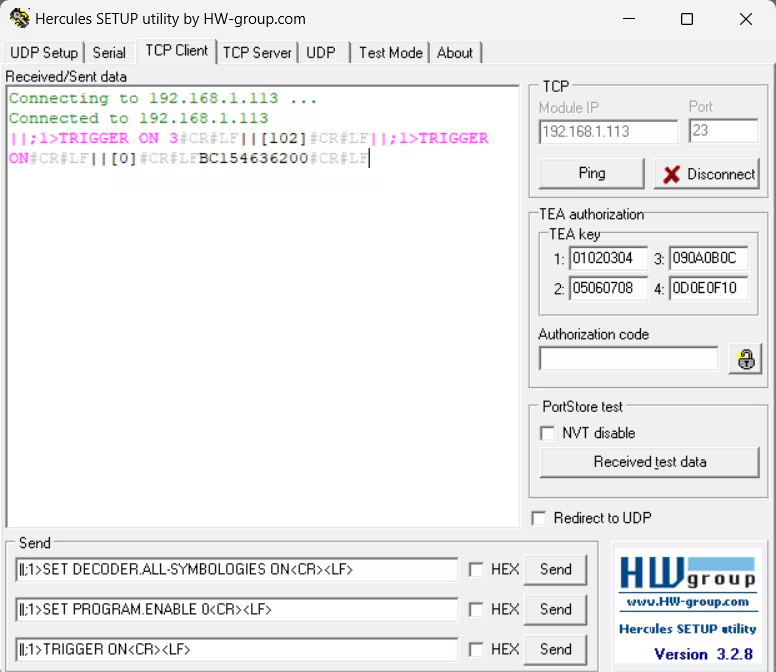
Details
This document provides guidance on sending DMCC commands to Cognex DataMan readers, as well as testing responses from the system.
Getting Started
- Install and launch the Hercules software.
- Connect to the appropriate Cognex reader.
Command Format
Commands should be formatted as follows:
||;1>COMMAND<CR><LF>
- ||> – Header indicating the start of a command.
- ;1 – Signals that the reader should return an execution status code.
- COMMAND – The actual instruction sent to the reader.
- <CR><LF> – Carriage return and line feed, recognized by the system as an "Enter" keypress.
Response Codes
After a command is executed, the reader may return one of the following codes:
- 0 – No error
- 1 – Reader initiated read-string
- 100 – Unidentified error
- 101 – Invalid command
- 102 – Invalid or missing parameter / unsupported feature
- 103 – Incorrect checksum
- 104 – Parameter rejected or modified due to reader state
- 105 – Wireless reader assigned to base station is not accessible
Example Commands
- ||;1>TRIGGER ON<CR><LF> – Activates the trigger
- ||;1>SET PROGRAM.ENABLE 0<CR><LF> – Selects a job (applicable for DM290/DM390 models)
- ||>SET SYMBOL.DATAMATRIX ON<CR><LF> – Enables Data Matrix symbology